


Cookbook Recipes & Meal Plans
4.51.91K Reviews
App Specs
- Version
- Varies with Device
- Updated On
- License
- Free
- Downloads
- 5,000,000+
- Developer
- Riafy Technologies
- Categories
- Food & Drink
- Platform
- Android, iOS
Screenshots
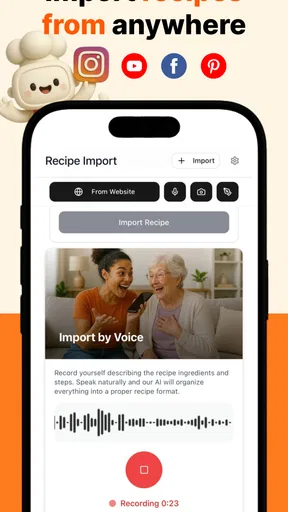
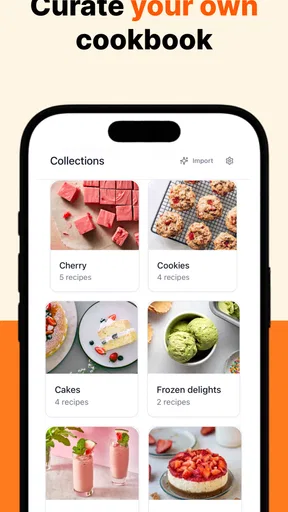
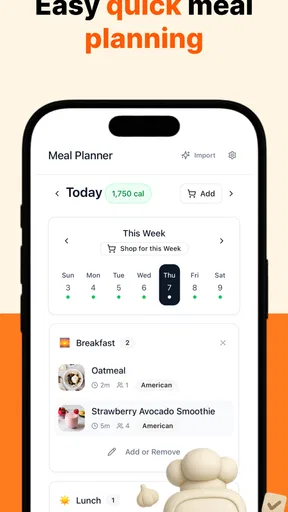
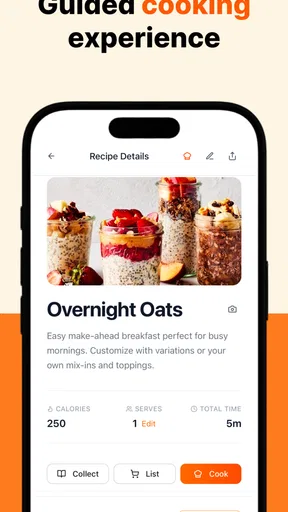
 Analysis by AppCompare
Hey there, fellow food enthusiasts! I recently had the chance to dive into the world of Cookbook Recipes & Meal Plans, and let me tell you, it was quite the delicious journey. If you're like me, always on the lookout for new and exciting ways to spice up your meals, then you're in for a treat. Let's dig into everything this app has to offer.
Discovering New Flavors
From the moment I opened Cookbook Recipes & Meal Plans, I was greeted with an array of vibrant and mouth-watering images of dishes waiting to be explored. It almost felt like I had my own personal chef, guiding me through culinary adventures I never thought possible. The app is designed to cater to all tastes and preferences, whether you're a seasoned chef or a kitchen newbie.
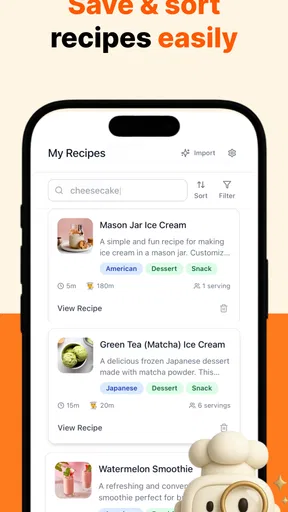
One of the things I loved most about this app is its user-friendly interface. Navigating through the different sections was a breeze, and I found myself effortlessly swiping through hundreds of recipes. Each recipe is thoughtfully categorized, making it super easy to find exactly what you're in the mood for. Craving Italian? Maybe some exotic Thai? No worries, this app has got you covered.
Meal Planning Made Easy
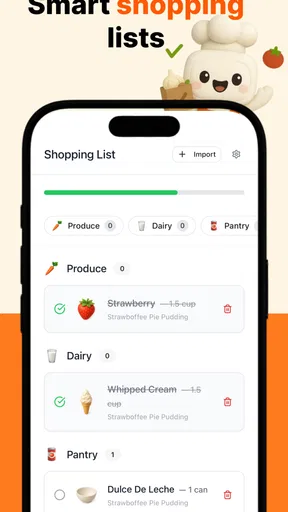
Now, let's talk about meal planning. If you're anything like me, planning meals for the week can sometimes feel like a chore. But with this app, it’s actually fun! The meal planning feature is a game-changer. You can select your favorite recipes, and it will seamlessly generate a grocery list for you. No more wandering the aisles aimlessly at the supermarket, wondering what to cook for dinner.
What’s more, the app tailors meal plans to fit various dietary needs. Whether you’re vegetarian, vegan, or following a keto diet, you can customize your meal plan to suit your lifestyle. It's like having a personal nutritionist in your pocket.
Exploring Features
Another feature that I found incredibly useful is the cooking tips and tricks section. It's packed with handy advice for improving your cooking skills. From mastering the perfect sear to getting your pasta just right, these tips can elevate your cooking game to the next level.
And let's not forget about the community aspect. You can share your culinary creations and even discover new recipes from other users. It's a fantastic way to connect with fellow foodies and exchange ideas. Who knows, you might even make a few friends along the way!
Worth Reading Before You Choose

Flipboard Shows What News Apps Must Do Beyond the Feed

Switching to Android Auto Means Rethinking Your Driving Routine

Google Calendar Makes a Crowded Week Easier to Manage

Ludo King Makes the Most of the Minutes Between Plans

Baby Panda World Brings Quick Play to Modern Phones, but Its Game Library Feels Busy

ESPN’s Live Game View Makes Following Close Games Easier
A Routine That Makes Weeknight Cooking Easier
The app makes the most sense when I treat it as a small planning tool rather than a complete answer to every food decision. At the start of the week, I can browse for a few recipes that suit the days ahead, then use the meal plan and grocery list to turn those choices into a practical shopping trip. That simple sequence is more useful than saving dozens of appealing dishes and hoping I remember them later.
For example, imagine getting home after work with little time to decide what to cook. If I chose a pasta dish and a chicken recipe earlier, I have a starting point instead of opening the fridge and improvising from scratch. I still need to check what ingredients I have and make sensible adjustments, but planning ahead can reduce the last-minute decision-making that often leads to ordering food or repeating the same meal.
A useful habit is to choose recipes with overlapping ingredients. If two of the dishes call for ingredients I can use across the week, I can shop with a clearer purpose and avoid buying items for a single recipe that may be left unused. The app’s grocery-list workflow supports that planning, but it cannot judge what is already in my cupboards or whether a particular ingredient will suit my household. I recommend reviewing the list before shopping rather than treating it as an unquestionable order.
Settings and Choices Worth Checking
When I’m choosing recipes, I start with the way I actually eat, not just with whatever looks good in a photo. The app covers options such as vegan and keto, as well as familiar categories like pasta and chicken. That range is handy for exploring, but a dietary label is only a starting filter: I would still read each recipe carefully to make sure its ingredients and preparation fit my needs.
This matters especially if a dietary choice is connected to a health concern, allergy, or strict personal requirement. A category label should not replace checking the ingredient list or seeking professional advice where that is important. For a household with different preferences, I’d use the categories to find a shared direction—perhaps a flexible base recipe—then decide separately how to adapt portions or toppings. The app can help surface ideas, but the cook remains responsible for those decisions.
I also think it helps to decide how much variety you want before browsing. If I’m in discovery mode, I can follow a cuisine or ingredient that sounds appealing. If I’m tired and need dinner to be predictable, I’m better off returning to a familiar kind of dish and choosing one recipe rather than scrolling indefinitely. The abundance that makes a cookbook app inspiring can also make it harder to settle on something when I haven’t set a simple boundary for myself.
Faster Patterns for Repeat Use
For experienced cooks, the most helpful shortcut is often a repeatable routine, not a hidden button. I’d pick a small group of recipes that suit the household, plan them together, and check the generated shopping list while there is still time to swap a dish. That way, the app supports a habit I can reuse instead of becoming another place where recipes accumulate without making it to the table.
There is also value in using the recipes as prompts rather than rigid instructions. If I know how to cook pasta, a recipe can give me a new combination to try; if I’m less confident with a technique, the cooking tips may provide useful guidance. I would still follow the recipe closely when trying an unfamiliar method, then make notes mentally about what I would change next time. This balance keeps the app useful to beginners without forcing a more experienced cook to treat every suggestion as a rule.
One practical trade-off is how ambitious the weekly plan should be. Choosing a different new recipe for every meal may sound exciting, but it can demand more shopping, attention, and time than a normal week allows. I get more value from mixing familiar meals with one or two experiments. That keeps the plan interesting while leaving room for changing schedules, leftovers, or evenings when cooking needs to be simple.
Where It Fits Among Recipe Alternatives
Compared with searching the web every time I need dinner inspiration, a cookbook app gives me a more focused place to browse recipes and organize meal choices. Search results can be useful when I have a very specific dish in mind or want to compare many versions, while this app’s appeal is having recipe discovery and meal planning together. If I already rely on a dedicated grocery service or a personal system for menus, I may prefer to keep using that rather than duplicate the same planning work here.
A printed cookbook can be more pleasant when I want to cook without a screen nearby, and a simple notes app may be enough if I only need to save a few family recipes. This app is a better fit when I want to explore a broader range of meal ideas and connect those choices to a shopping list. The best option depends on the friction I’m trying to remove: finding inspiration, organizing the week, or keeping a trusted collection of recipes in one familiar format.
It is also worth setting expectations about what meal planning can do. A planned menu can make shopping and deciding easier, but it cannot guarantee that every recipe will suit my taste, fit the time I have, or use what is already at home. I see the plan as a helpful draft. Leaving a little flexibility in it is more realistic than expecting a week of meals to unfold exactly as scheduled.
Who Will Get the Most from It
I’d recommend it to someone who wants fresh ideas but also wants those ideas to lead to actual meals. It can be especially useful for a new cook who needs approachable inspiration, a busy household trying to plan ahead, or a person exploring different styles of eating. The combination of categorized recipes, meal planning, grocery-list support, and cooking tips gives those users more than a gallery of food photographs to browse.
On the other hand, I would skip it if I need a strict nutrition tracker, a medically tailored diet plan, or an exact system for managing allergies. I would also think twice if I prefer to decide each meal spontaneously and rarely shop from a list. The app’s planning approach is most valuable when I am willing to choose recipes ahead of time and review the ingredients, rather than expecting the app to make every food decision for me.
Cookbook Recipes & Meal Plans is a free Food & Drink app from Riafy Technologies, with optional in-app purchases. Its average rating is 4.4 from around 63,000 ratings, and it has over 5 million installs. The age rating is Teen. Those details suggest a well-established audience, but the practical question for me is whether its recipe browsing and planning style matches the way you cook.
Why You Should Try It
Cookbook Recipes & Meal Plans is more than just a recipe app; it’s a comprehensive tool designed to inspire and simplify your cooking experience. The seamless integration of meal planning, coupled with a rich database of recipes, makes it a must-have for anyone looking to expand their culinary horizons.
In conclusion, if you’re looking to transform your everyday meals into extraordinary experiences, give this app a try. It’s like having a world of flavors at your fingertips, ready to be explored. Happy cooking!
Pros
- Extensive recipe variety for all diets.
- User-friendly interface with smooth navigation.
- Customizable meal plans for personal goals.
- Offline access to saved recipes.
- Nutritional info included for each recipe.
Cons
- Limited free features; requires subscription.
- Occasional recipe inaccuracies reported.
- Ads can be intrusive in the free version.
- No option for community recipe sharing.
- Lacks integration with grocery delivery apps.
FAQs for Cookbook Recipes & Meal Plans
What features does Cookbook Recipes & Meal Plans offer?
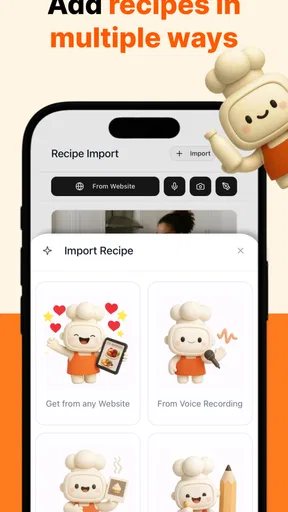
Cookbook Recipes & Meal Plans offers a variety of features including a vast collection of recipes, customizable meal plans, grocery lists, and dietary preferences filtering. Users can explore new dishes, save favorites, and even adjust serving sizes. The app also provides step-by-step instructions and nutritional information for each recipe.
Is Cookbook Recipes & Meal Plans suitable for beginners?
Yes, the app is designed to be user-friendly for all skill levels. Beginners will find detailed, easy-to-follow instructions and helpful tips. The app also includes video tutorials and a glossary of cooking terms to guide new cooks through the learning process. Advanced users can enjoy more complex recipes and meal planning features.
Does the app support dietary restrictions and preferences?
Absolutely, Cookbook Recipes & Meal Plans caters to various dietary needs including vegetarian, vegan, gluten-free, and keto diets. Users can filter recipes based on their dietary requirements, ensuring they find suitable options. The app also allows for customization of meal plans to adhere to specific nutritional goals or restrictions.
How does the meal planning feature work?
The meal planning feature allows users to create weekly or monthly meal plans by selecting recipes from the app’s extensive library. Users can customize these plans according to their schedule and dietary needs. The app generates a comprehensive grocery list based on the selected recipes, making shopping efficient and organized.
Is the app available offline?
Yes, Cookbook Recipes & Meal Plans offers offline access to saved recipes and meal plans. Users can download their favorite recipes and planned meals to their device, allowing them to cook without needing an internet connection. This is particularly useful for users with limited data or those in areas with unreliable internet access.


